



What is a digital certificate and what is Cl@ve in Spain?
The digital certificate and Cl@ve in Spain are the two main systems that let you identify yourself online to Spanish public administrations. To file a tax return from home, sign an official document remotely, or access your social security file, one or the other becomes nearly indispensable. But they work differently, do not open exactly the same doors, and their installation can give cold sweats to newcomers unfamiliar with administrative cryptography.
This article explains exactly what a digital certificate is, what Cl@ve is, how they differ, how to obtain them, which to choose for your needs, and how to install them on your computer or smartphone. We also detail the procedures that require them, the most frequent pitfalls, and troubleshooting solutions when something goes wrong.
What is a digital certificate in Spain?
The digital certificate is a cryptographic file that lets you sign and identify yourself electronically with the same legal value as a handwritten signature.
Technical definition
A digital certificate is a file in X.509 format (international standard) issued by a certification authority recognised by the Spanish state. It links your identity (name, NIE/NIF) to a pair of cryptographic keys (public and private) that let you sign documents electronically and prove your identity against secure administrative servers.
The main certification authorities
The most used authority for individuals is the FNMT (Fábrica Nacional de Moneda y Timbre). It issues free certificates via the "Certificado de Persona Física" service. Other authorities are recognised: Camerfirma (often used by companies), ANCERT (notaries), Izenpe (Basque Country), and several regional authorities.
Format and installation
The certificate is delivered as a file (.pfx or .p12 extension) protected by a password. You install it in your browser (Chrome, Firefox, Edge) or in your credentials store (Windows, macOS). Once installed, it is automatically usable to identify you on the sede electrónicas that recognise it.
What is Cl@ve in Spain?
Cl@ve is a government identification system that simplifies access to online services without installing a certificate.
Definition of Cl@ve
Cl@ve is an online identification system created by the Spanish state to ease access to digital public services without the complexity of a digital certificate. It comes in several modalities depending on the security level required: Cl@ve PIN, Cl@ve Permanente, and Cl@ve Firma.
The three Cl@ve modalities
- Cl@ve PIN: a single-use PIN system, valid 10 minutes. You receive a code by SMS or via the Cl@ve PIN app on your smartphone. Suited to occasional procedures.
- Cl@ve Permanente: permanent credentials (password + SMS confirmation) for recurring procedures. More convenient if you often use online services.
- Cl@ve Firma: an electronic signature equivalent to a digital certificate, but cloud-hosted (no local installation). Useful for procedures requiring an actual signature.
Advantages over the digital certificate
Cl@ve avoids the complexity of installing and exporting a certificate. You can connect from any computer or smartphone without having to carry your certificate. It is more convenient for occasional users and for those who often switch devices.
What are the main differences between the digital certificate and Cl@ve?
The two tools look similar on paper but have different use cases.
Installation difference
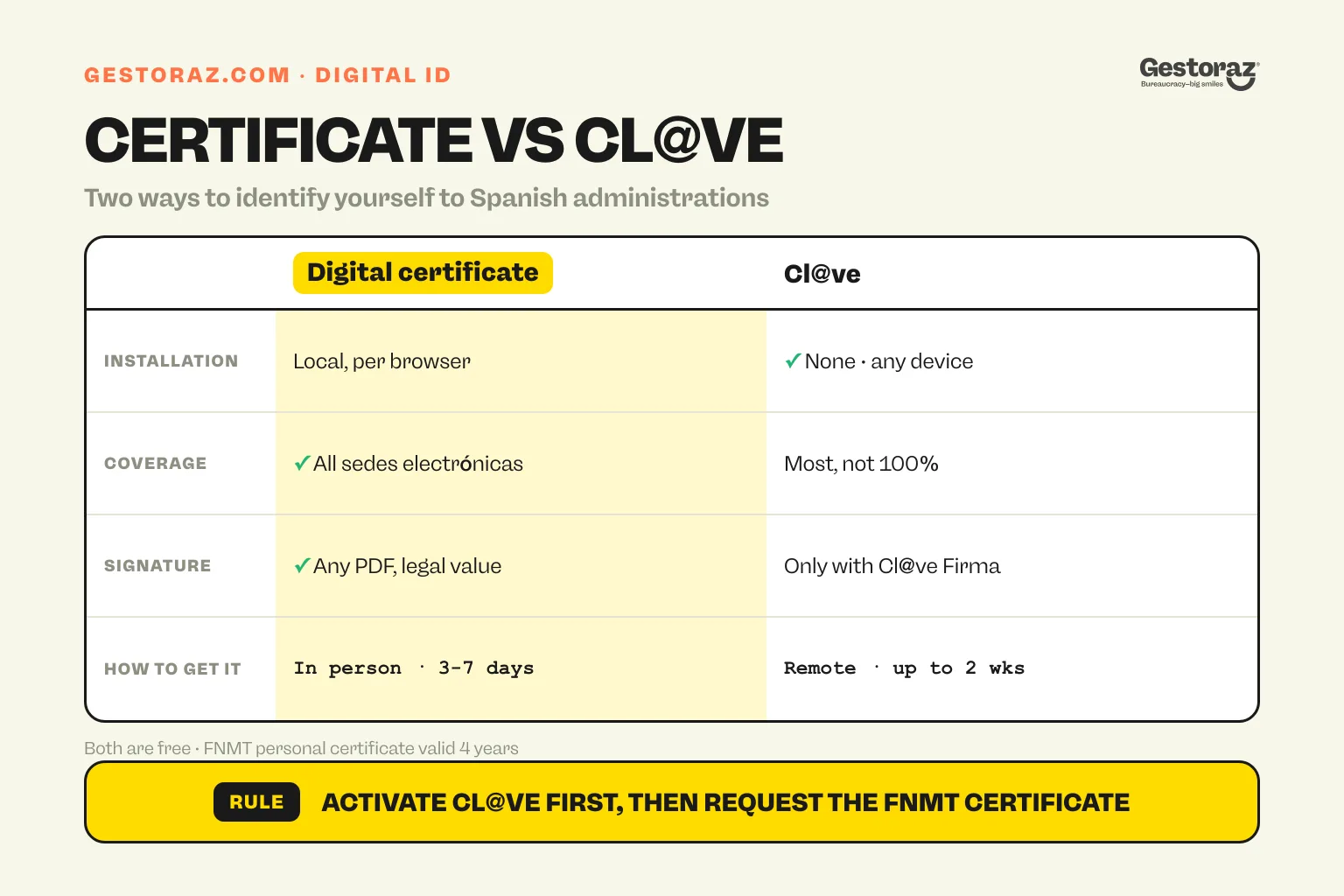
The digital certificate requires local installation in your browser or credentials store. If you change computer, you must export the certificate and reinstall it. Cl@ve requires no installation: you connect with a PIN or password, valid from any device.
Coverage difference
The digital certificate is universally recognised by every Spanish sede electrónica, including regional and municipal portals. Cl@ve is recognised by the majority but not by 100% of services: some regional portals only accept the certificate.
Signature difference
With a digital certificate, you can electronically sign any PDF document with legal value equivalent to a handwritten signature. With Cl@ve, only Cl@ve Firma offers that feature, and it is less universally accepted than certificate signing.
Acquisition difference
The digital certificate requires in-person identity verification (at an FNMT or Agencia Tributaria office) after an online request. Cl@ve can be activated entirely remotely via SMS and postal code, making it the fastest option to obtain.
How do you obtain a digital certificate?
The procedure runs in three main steps.
Step 1: online request on the FNMT site
Go to sede.fnmt.gob.es, choose "Certificado de Persona Física", then "Obtener Certificado Software". The system asks for your NIF/NIE, your full name, and your email. Important: you will need your número de soporte which you will find on your NIE document. To identify that number correctly, see where to find the número de soporte.
At the end of this step, you receive a código de solicitud (request code) that you must keep carefully.
Step 2: in-person identity verification
With your código de solicitud, your original NIE document and your passport, you go to a registration office (oficina de registro). You can choose between FNMT offices, Agencia Tributaria, social security, or some town halls. The clerk verifies your identity and validates your request in the system.
Step 3: certificate download
A few hours after verification (sometimes 24-48 h), you go back to the FNMT site from the same computer and same browser as for the original request. You download the certificate with your código de solicitud, and the browser installs it automatically. You can then export it to back it up or copy it to other devices.
Lead time and cost
Total lead time: 3 to 7 days depending on cita previa availability. Cost: free for the personal certificate. For representative or company certificates, fees apply by authority (Camerfirma charges around €30-€60 per year).
How do you obtain Cl@ve?
The procedure depends on the chosen modality.
Activation by digital certificate (the fastest)
If you already have a digital certificate installed, you can activate Cl@ve PIN and Cl@ve Permanente in a few minutes on clave.gob.es. You set your parameters (phone number for SMS, password for Cl@ve Permanente), and you are done.
Activation by registration card
If you have no digital certificate, you can activate Cl@ve in person at a registration office (oficina de registro) with your original NIE document. The clerk registers you in the Cl@ve system and you receive a confirmation code by SMS straight after.
Activation by registered letter (no travel)
For purely remote procedures, you can request activation by registered letter. You receive a code at your Spanish postal address, which you then use on the Cl@ve portal to finalise activation. This method takes 1-2 weeks but avoids any physical travel.
Lead time and cost
Total lead time: immediate to 2 weeks depending on the route. Cost: free in every case.
Which to choose: digital certificate or Cl@ve?
The choice depends on your usage and profile.
Digital certificate recommended if...
You run many online procedures (quarterly tax returns, social security follow-up, contract signings); you want to electronically sign PDF documents with legal value; you always use the same computer; you operate an SL in Spain or you are an autónomo with recurring fiscal needs.
Cl@ve recommended if...
You run occasional procedures (1-2 times a year, the annual tax return for instance); you use multiple devices (work computer, personal computer, smartphone); you do not want to manage the complexity of a certificate; you do not need an advanced electronic signature.
Both together: the best strategy
For many expats and entrepreneurs, having both systems is the right choice: Cl@ve for mobility and convenience, digital certificate for procedures that only work with it (notably some complex fiscal modelos or regional portals). Both are not exclusive and their installations can be combined.
What procedures require a digital certificate or Cl@ve?
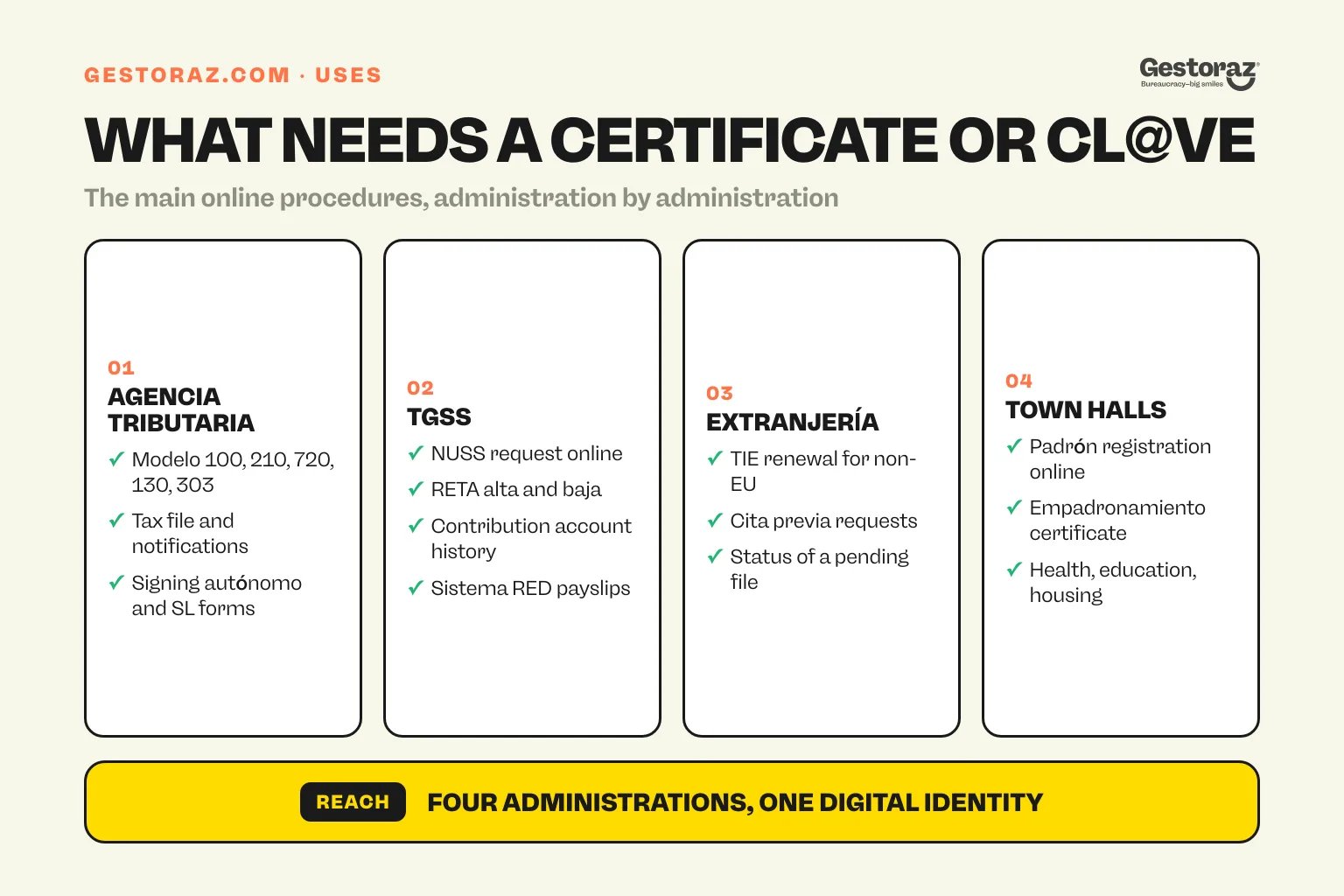
Here is an overview of the main uses, organised by administration.
Agencia Tributaria
- Online tax filing (modelo 100, 210, 720, 130, 303).
- Consulting your tax file and notifications.
- Signing fiscal forms for autónomos and SLs.
- For fiscal details by status, see how much tax a non-resident pays and taxes for an SL.
Tesorería General de la Seguridad Social (TGSS)
- Online NUSS request (see everything about the NUSS number).
- RETA alta and baja for autónomos.
- Consulting the contributor account and contribution history.
- Payslip management for companies (Sistema RED).
Ministerio del Interior (Extranjería)
- Online TIE renewal for non-EU citizens.
- Cita previa requests for some procedures.
- Status check on a pending request.
Town halls and autonomous communities
- Online padrón municipal registration (some town halls).
- Municipal certificate requests (empadronamiento, urban planning).
- Regional procedures (health, education, social housing).
Other bodies
- Notaries (some electronic notarial procedures).
- Bank of Spain (consolidated bank statement requests).
- DGT (General Traffic Directorate) for vehicle procedures.
What pitfalls are common with the digital certificate and Cl@ve?
Several mistakes recur and complicate use.
Confusing NIE and número de soporte
When requesting the digital certificate, the FNMT form asks for the número de soporte, not the NIE. Many users enter their NIE and receive an error. Identify the right field correctly before entering. The detail is in where to find the número de soporte.
Switching browsers without exporting the certificate
The digital certificate is installed in a specific browser. If you install Chrome then switch to Firefox, the certificate is not automatically available in Firefox. You must export it from Chrome (in .pfx format) then import it into Firefox (or into the operating system's credentials store).
Forgetting the export password
When you export your certificate, you set a password to protect the .pfx file. Without that password, you cannot reinstall it elsewhere. Note it carefully.
Using Cl@ve from abroad without a Spanish phone
Cl@ve PIN sends the code by SMS to your registered phone. If you change number or are abroad without access to your Spanish number, you do not receive the PIN. Plan to update your details on the Cl@ve portal before a trip.
Expired certificate
Digital certificates have a limited validity (generally 4 years for the FNMT). You receive a reminder email before expiry, but many users miss it and find themselves blocked at the time of their annual tax return. Renew at least one month before expiry to avoid stress.
Confusing Cl@ve PIN and Cl@ve Permanente
Cl@ve PIN is one-off (a different PIN each time); Cl@ve Permanente always uses the same password. Check which system the procedure is asking for to avoid looking in the wrong place.
What to do in case of a problem?
A few standard troubleshooting paths.
The certificate does not install
Check the version of your browser (older Chrome or Firefox versions cause issues). Also check that you are downloading from the same browser as the one you used for the original request. If still not working, contact FNMT support.
Cl@ve does not receive the SMS
Check that your number is correctly registered and up to date on clave.gob.es. Check that your operator does not block short international SMS. As a last resort, request reception by email (option available on some procedures).
The sede electrónica refuses my certificate
This happens when the certificate is installed in the browser but not recognised by the portal. Solutions: restart the browser, check that the certificate is not expired, try another browser, or contact the support of the relevant sede.
I lost my certificate
You can re-download it from the FNMT site if you kept your código de solicitud. Otherwise, you have to start the full request again (3-7 days).
In short on digital certificate and Cl@ve
The digital certificate and Cl@ve in Spain are the two tools that open the doors of the digital administration. The certificate is more powerful and universally recognised, but more complex to install; Cl@ve is simpler and more mobile, but less universal for advanced procedures. For most active expats, having both is the most comfortable solution. The cost view sits in what an NIE number costs since it is part of the same set-up.
The practical rule: start by activating Cl@ve (free, immediate with a certificate or in a few days by post), then request a FNMT digital certificate for the procedures requiring it. Always keep an exported copy of your certificate and noted passwords to be able to restore it if needed.
Struggling with the digital certificate request, Cl@ve activation, or browser installation? At gestoraz, we can manage the full procedure remotely, identify the correct número de soporte, and install the certificate on your devices so you can start working online without friction.
Official sources
- FNMT, Fábrica Nacional de Moneda y Timbre, sede.fnmt.gob.es: digital certificate request and installation for individuals.
- Cl@ve, clave.gob.es: official portal for activation and management of Cl@ve PIN, Permanente and Firma.
- Real Decreto 137/2010 (BOE), boe.es/buscar/act.php?id=BOE-A-2010-2950: regulation on electronic signature in Spain.
- Ley 6/2020 de servicios electrónicos de confianza (BOE), boe.es/buscar/act.php?id=BOE-A-2020-13230: new law on digital trust services.
- Agencia Tributaria, sede electrónica, sede.agenciatributaria.gob.es: certificate / Cl@ve integration for fiscal procedures.
- Sede electrónica de la Seguridad Social, sede.seg-social.gob.es: social procedures with certificate or Cl@ve.


Obtain your Digital Certificate entirely remotely.
Request your Digital Certificate completely remotely.

